Showing posts with label WordPress Plugins. Show all posts

Ultimate Guide to Develop Your First WordPress Plugin

The best thing about WordPress is it can be customized and extended with plug-ins. Developing WordPress plug-in seems like a difficult task; however it is actually simpler than you may think. In this post, we are going to teach you how to develop WordPress plug-in with few simple steps.

ultimate guide to develop beginners' first WP plugin

Before beginning with development task, I'm providing information about what actually WordPress plug-in is. Let me tell you something:

Actually WordPress' first plugin supported version was WordPress 1.2 Mingus. And the first plugin was developed on Monday 19 April 2004 by Dean Allen. The name of that plugin was This is Textile, A Humane Web Text Generator.

Ahead, WP plugin is a PHP script that customize and extend the native functionality of WordPress. Installing flexible Plug-in API in your WordPress, you will enjoy many advantages like:

● It makes your modularity of code for a particular project increases and make updates and maintenance easier than before.

● Develop separate Plug-in functionality from themes

● Extended code base

● Allows using same plug-ins with various themes and has some design-independent functionality

● Implementing modern programming techniques, OOP is easier with a PHP script; at same time it has ability to use native WordPress functions, classes and APIs.

The main task for beginner is to first build a solid plugin foundation that meets WordPress requirements and make plug-in more recognizable. Your plug-in should follow common practices and conventions that accepted by community.


Plugin Name and Files

Firstly, you have to create a unique plug-in name. Create the brand prefix to increase the chance of a name being unique. Ensure to prefix with short reference to the plugin’s name in names of files, classes, functions, variables, etc. as it avoids conflicts with other plug-in’s name and the core as well.

Now, we are going to adopt the name Hello World Plugin and to increase the chance of uniqueness, we are going to use My Plugin converted into abbreviation MP. Now, the exact name would be MP Hello World Plugin. In next step, you have to create the plugin’s files and store them in separate folder inside a dedicated plugin folder. Now, name this folder in accordance with plugin, i.e. mp-helloworld. The main plug-in file is also included in this folder with the same name: mp-helloworld.php.

It is also recommended to use a readme.txt file by WordPress Codex as this file has detailed information about your plugin in a standardized format. It is must to have readme.txt, if you are going to submit your plugin to the WordPress repository. Don’t think that it is burden for you; it provides you many advantages as well. Moreover, if you’re plug-in have many files or load some assets like images, css and js files then it should be managed in sub-folders. You can organize file like this way:

File Structure

Plugin Header

Every plug-in must have header. Having header helps you to organize the script as a valid plugin and provide output proper information on the plugins’ management screen. One can find header, which is a PHP comment block, at the top of the main plugin’s file:

/*
Plugin Name: MP Hello World
Description: Create hello world message
Version: 1.0
Author: Author's name
Author URI: http://authorsite.com/
Plugin URI: http://authorsite.com/mp-helloworld
*/

One can see the header’s information in the corresponding plugin’s row on the management screen.

Plugin Screen

No matter you lines are in order to not, ensure to have in UTF-8 encoding. It is essential to be consistent with the version numbering pattern that you have selected for the WordPress upgrade mechanism to perceive it accurately.


Paths to Files

In next step, we have to decide the correct paths (or URLs) inside the plug-in code. It is clear that paths to plugin files should not be hardcoded as the wp-content folder but could be moved from its default location and it should be detected. plugin_dir_path and plugin_dir_url are the two WordPress funcations that address the issue. However, we can move further by using various tricks:

define('MP_HELLOWORLD_DIR', plugin_dir_path(__FILE__));
define('MP_HELLOWORLD_URL', plugin_dir_url(__FILE__));

One can easily detect the path and URL of the plugin’s folder with this little snippet inside the WordPress installation and can also assign them to suitable constants. Then, we are going to use these constants with known relative paths to sub-folders, for example MP_HELLOWORLD_DIR.'assets/img/image.jpg'. One can easily add plugin files from sub-folders inside the main file by using these constants:

function mp_helloworld_load(){
  
    if(is_admin()) //load admin files only in admin
        require_once(MP_HELLOWORLD_DIR.'includes/admin.php');
        
    require_once(MP_HELLOWORLD_DIR.'includes/core.php');
}
mp_helloworld_load();

Plugin States

In this state, plug-in could be in an active or inactive state after installation. Active states mean that it was activated by the user and its code will be implemented by WordPress every time a page is requested.

In case, the plug-in could be deactivated by the users that means the files are kept in their place, but the codes isn’t implemented. In these states, changes can be caught by WP and can also implement some code planned for such changes. If any code is scheduled for activation or deactivation then it will be executed instantly without loading page.

One can register a so-called activation hook and deactivation hook for activation and deactivation actions. It is just a code that allows WP to implement one particular function on activation and another on deactivation. Below given is an example of such code:

register_activation_hook(__FILE__, 'mp_helloworld_activation');
register_deactivation_hook(__FILE__, 'mp_helloworld_deactivation');

function mp_helloworld_activation() {
    
 //actions to perform once on plugin activation go here   
}

function mp_helloworld_deactivation() {    
 // actions to perform once on plugin deactivation go here     
}

If you want to uninstall actions then you can with two alternatives. Firstly, you have to create a uninstall.php file in the plugin’s folder and add all required code. Once you uninstall.php exists, WP automatically will perform it when the plugin is deleted by the user.

Secondly, you can register an uninstall hook like we did with the activation and deactivation hooks. The difficult part is to call it only once on activation like:

register_activation_hook(__FILE__, 'mp_helloworld_activation');

function mp_helloworld_activation() {
    
    //actions to perform once on plugin activation go here    
     
    //register uninstaller
    register_uninstall_hook(__FILE__, 'mp_helloworld_uninstall');
}

function mp_helloworld_uninstall(){
    
    //actions to perform once on plugin uninstall go here     
}

Keep in mind that only one alternative will work. If uninstall.php exists, it will be performed and any uninstall hook will not be fired. Before moving further, you have to keep some important points in your mind.

It is advisable to develop plug-in with debugging. One can find huge information about the WP debugging mode and different plug-ins as well to get additional notifications. It becomes your relievable assistants to make error-free and up-to-date code.

Following WordPress Coding Standards helps to make maintain the consistency of the core code within your plugin. For common task, you can use APIs, core functions, and classes. Different types of tools for commonly required operations are provided by WordPress to developers so they can deliberate on the truly unique functionality of your plug-in.

Now, we are going to know the concept of hooks, actions, and filters. Let’s know about hooks in details, it is specially marked place in the code, where one can deliberately registered hooked into functions to define registration. There are two different types of hooks in WP, i.e. Action hook that makes the place to execute an action and Filter hook that marks the place to apply a modification to a value so the code will utilize the adjusted value.

Let’s move to the details and see the common logic of the WordPress actions. You have to mark the place, where the custom code should go with an action hook and its parameters. Now, you have to create the action function that performs the new code using parameters offered by the hook.

Register the action (#2) to be executed when the hook (#1) is fired with some main concern. At the time when the requested page is loaded by WordPress and finds the hooks, then it will search for all functions hooked into it and carry out them one by one appropriate to their priority. One can have to perform do_action function to perform task #1:

do_action($tag, $arg_1, $arg_2, ... , $arg_n);

Following parameters like tag – the hook name, $arg_1, $arg_2, … , $arg_n, etc. are accepted. WordPress itself using a lot of predefined hooks like:

do_action( 'init' );

Being a very straightforward case, one shouldn’t have to have to add extra parameters. When the most of WordPress is set up, this hook is fired and at that time, custom objects, like custom post type, etc. should be registered.

do_action('save_post', $post_id, $post);

When post is saved, the hook is fired and provides two additional parameters to operate with post_id and post object containing all the data from the saved post. However developing hooks is not a privilege of the core team. Every developers have to create a custom hook for the plug-in or theme.

All thanks to this as it provides more power like theme frameworks allow child themes to change the style and also the markup of parents without overwriting whole files.

do_action( 'my_truly_custom_hook' );

One can have to register the latest for the execution with add_action when he/she create a proper hook and created a custom function for it.

add_action($tag, $function_to_add, $priority, $accepted_args_number);

The two obligatory parameters are accepted by the add_action method, i.e. $tag: the name of the proper hook and $function_to_add: the name of the function that should be performed. In this case, the two parameters are optional: $priority: an integer to specify for registering the functions (by default, 10), $accepted_args_number: number of arguments that the registered function is going to accept (by default, 1). Look at the example for better understanding. We have use the wp_footer hook as it is a part of obligatory footer code that every theme should include.

function mp_helloworld_footer_notice(){        
      echo "<div id='mp-helloworld-notice'>Hello, I'm your custom notice</div>";
}
add_action('wp_footer', 'mp_helloworld_footer_notice');

With this example, you will understand the prefixed function that that simply outputs the notice’s markup and after that, hooked it into the wp_footer. Once you will add this code in your plug-in file, you will see the result on the site.

custom notice

Working with Filters

In this step, you have to filters operated with same logic as actions. However, you just don’t have to perform some piece of coding in a certain place. Execution of code is done just TO MODIFY some value given to them by the hook. That simply means you will find every filter hook connected with the associated value.

This value should be taken by the function that executes this value and after that, it returns it for further usage. We have seen that the syntax of functions responsible for filters and hooks are bit different.

apply_filters($tag, $value_to_filter, $arg_1, $arg_2, ... , $arg_n);

A filter hook with $tag name and the obligatory parameter $value_to_filter is created by the function apply_filter. Other arguments are discretionary and work the same ways as for actions.

filter_function($value_to_filter, $arg_1, $arg_2, ... , $arg_n){
       //filtering code goes here
       return $value_to_filter; //value has to be returned back
}

According to the skeleton of filter function, it should be accept at least one argument, the value for modification; and return the value at the end.

add_filter($tag, $function_to_add, $priority, $accepted_args);

A function with a name given as the $function_to_add argument for the $tag filter hook is registered by add_filter. We have seen the optional arguments like $accepted_args and $priority work in the same ways as for action hooks.

Let’s show the whole procedure in action: a common plug-in is to add some content at the end of a post. One can find below given filter hook, if we look closer at the the_content template tag that used to output a post’s content in a theme

$content = apply_filters('the_content', $content);
With this hook, one can add something at the end of the post in the following way: 
function mp_helloworld_post_footer($content) {         
        $content .= "<div class='mp-helloworld-post-footer'><p>Hello, I'm your custom post footer</p></div>";
        return $content;
}
add_filter('the_content', 'mp_helloworld_post_footer', 100);
Note:

We are using quite large number for priority that makes sure us to all default filters have been applied before our mp_helloworld_post_footer. One should see below given result on the site after including the code in the plugin’s file.

Post Footer

How to Find Hooks

One should need to know that what hooks are available as it is obvious to implement action and filter functionality. An Action Reference is provided by the WordPress Codex with most of action hooks fired on typical page load and a Filter Reference with a list of commonly used filters. With the help of these references, one can simply understand the order of actions and logic of filters so one can able to select where and when functionality can and should be injected.

Then, you are ready for the trip into the source code and just execute a search through the WordPress files for the do_action and apply_filters keywords in order to search the needed hook. Having information about WordPress query logic helps you work out where some hooks can be searched for. At last, one can have to refer the WordPress Hooks Database that has full information about the hooks in the core files.


Advanced Operations with Hooks

Actions and filters can also be removed with a similar syntax no doubt it has being added to your plug-in. If you want to remove action, you have to follow below given manner.

remove_action($tag, $function_to_remove, $priority, $accepted_args);
remove_all_actions($tag, $priority);

A particular action registered for a particular hook is removed by remove_action and with remove_all_actions, one can remove all actions registered with a certain hook with a given precedence. One can have heard about a popular security recommendation that helps to hide the WordPress version from the head section of the site. It is a job for remove_action. Firstly, you have to search out the hooks the wp_generator function to print the version information by browsing default filters. Below given thing can be done by code like this:

add_action('wp_head', 'wp_generator');

You have to add the opposite function in your plug-in to eliminate the effect of this code.

remove_action('wp_head', 'wp_generator');

In same way, Filters can be removed.

remove_filter($tag, $function_to_remove, $priority, $accepted_args);
remove_all_filters($tag, $priority);

Developers will get the Plugin API with a way to detect whether the particular hook has registered functions to perform:

has_action($tag, $function_to_check);
has_filter($tag, $function_to_check);

With both of the function, one can check whether a particular action or filter is registered for a hook and returns: false on failure and true on success. One can have to check ability inside the hooked function in the following way:

if('hook_to_check_name' === current_filter()){
    //do stuff related to 'hook_to_check_name' hook
}

The current_filter works with filters and actions as well. It is advisable to refer Codex for the full set of Plugin API functions.


Real-world Case

Now, let’s open plug-in skeleton that you have created. Now, we are going to add the core.php file with the code that helps to solve a task with actions and filters. In this step, you have to create a custom taxonomy that handles the guest author’s name and short author’s bio. So, any author can provide you a guest article after registering at your site. Moreover, this also ensures you provide credit to the actual author.

For this, you have to assign author’s names as any other taxonomy’s terms to the post. Now, it becomes possible to get an result from an box right after the post’s text. See the code below.

/** Hook plugin's action and filters **/
function mp_helloworld_init(){
    
    add_action('init', 'mp_helloworld_taxonomies');
    add_filter('the_content', 'mp_helloworld_author_block_filter');
    add_filter('post_class', 'mp_helloworld_post_class');
    
}
add_action('plugins_loaded', 'mp_helloworld_init');

/** Register custom taxonomy **/
function mp_helloworld_taxonomies(){
    
    $args = array(
        'labels' => array(
            'name'          => 'Guest authors',
            'singular_name' => 'Guest author'
        ),        
        'show_in_nav_menus' => false        
    );
    
    register_taxonomy('gauthor', array('post'), $args);
    
}

/** Create author's box markup **/
function mp_helloworld_author_block(){
    global $post;
    
    $author_terms = wp_get_object_terms($post->ID, 'gauthor');
    if(empty($author_terms))
        return;
    
    $name = stripslashes($author_terms[0]->name);
    $url = esc_url(get_term_link($author_terms[0]));
    $desc = wp_filter_post_kses($author_terms[0]->description);
    
    $out = "<div class='gauthor-info'>";
    $out .= "<h5>This is a guest post by <a href='{$url}'>{$name}</a></h5>";
    $out .= "<div class='gauthor-desc'>{$desc}</div></div>";

    return $out;
}

/** Add author's box to the end of the post **/
function mp_helloworld_author_block_filter($content){
    
    if(is_single())
        $content .= mp_helloworld_author_block();
        
    return $content;
}

/** Add custom CSS class to the post's container **/
function mp_helloworld_post_class($post_class){
    global $post;
    
    $author_terms = wp_get_object_terms($post->ID, 'gauthor');
    if(!empty($author_terms)){
        $post_class[] = 'gauthor';
    }
    
    return $post_class;
}

It is recommended to apply an action to register a custom taxonomy to the init hook. So in next step, you can create the template tag, which is responsible for the author box’s markup using native WordPress functions such as wp_get_object_terms.

Now, you have to attach this box at the end of post content by using the_content filter hook. Lastly, we have to add the custom CSS class for the guest posts’ container that makes flexibility in the style of the theme. After applying some style, you will see outcome like:

Guest Author

Options API

The Options API is one of the consistent ways of storing data in the database. Under a given custom name, all the data is saved in the wp_options table and can be accessed through from somewhere in the code. Below given is the most essential function of the API.

<?php get_option('opting_name'); ?>
<?php update_option('option_name', $new_value); ?>

One can find the get_option function from the database and you can have any information stored under a given name and returns it. An option name is taken by the function update_option and its value and updates the matching entry in the database. It you don’t find any entry then it will make automatically. One can operate both the function with arrays as well as single values. That simply means, you can store array of data under a single name in the database and serialization and mineralization actions will be handled by the API on behalf of you. It is recommended to store plug-ins as an array under a single name.


Plugin Options’ Page

Now, you have to create a settings page or group of pages in the admin menu for your plugin. For creating a group of pages, you have to add a top level page first:

<?php add_menu_page( $page_title, $menu_title, $capability, $menu_slug, $output_function, $icon_url, $position ); ?>

We find the parameter values are self-explanatory, but it can be referred to the source for details. Now, one can have to add internal pages one by one in the following manner:

<?php add_submenu_page( $parent_slug, $page_title, $menu_title, $capability, $menu_slug, $function ); ?>

One can have to use the ID of the top level page as a $parent_slug parameter. Moreover, in the case of custom top level, you have provided the value as $menu_slug upon registration. One can create a single page under one of existing top-level sections, if he/she didn’t need several pages. For that you have to use Settings options-general.php should be used as the $parent_slug. On other side, you can add shortcut functions for adding subpages under certain admin menu items it’s add_options_page in Setting option.


Settings API

An interface is created in the Settings API that allows managing the plugin’s settings. You have to mark a page as a settings page in order to process input automatically and also output sections on the page and fields inside each section for accepting user input. Now, you have to develop section-fields structure to attain that the first goal is to register settings with the system.

<?php register_setting($option_group, $option_name, $sanitise_callback); ?>
<?php add_settings_section( $id, $title, $callback, $page ); ?>
<?php add_settings_field( $id, $title, $callback, $page, $section, $args ); ?>

It is advisable to refer the Codex for a detailed description of the parameters; however the logic is bit simpler. Firstly, you have to register options name and then, have to register section(s) with set of fields for each section and an internal ID. Through API, you can have ability to specify custom callbacks for input validation and showing each field and section.

Once, you have to complete registration of options and corresponding fields then you have to display them on the settings page with below given function that called inside the <form> tag:

<?php settings_fields($option_group); ?>
<?php do_settings_sections($page); ?>

With the settings_fields function, you can obligatory hidden fields for the native WordPress alternatives mechanism to work. Actually, the do_settings_sections outputs previously registered sections and fields.


Security Considerations

One can only have to clean the input, escape the output and take care of capabilities when dealing with fundamental security rule. One can also have to escape to output special characters, particularly HTML when showing data extracted from the database. Native functions are provided by both the tasks by WordPress that can be used in different contexts. For more information, you can visit here.

The users’ permissions are another point of concern. WordPress has integral mechanism controlling users’ roles and capabilities that blocks access to particular admin areas for users with limited permissions. Only admin can access anything he/she wants to. At the time of developing options pages, one can have to allocate correct capabilities, generally, it is manage_options. Additionally, it doesn’t allow users with low privileges to access the page. If you want to know more information about WordPress roles and capabilities, refer Codex.


Put it All into Work

Now, we are going to see the whole scenario in action. We are going to create Hello World example that shows information about guest author under a post through custom taxonomy. Previously, we found hard code into the plug-in by author’s block markup. But now, we are providing an ability to users to specify a template for that markup using placeholders for author-specific data (name, url and description). We have two includable PHP files, i.e. core.php (containing the main code) and admin.php (containing admin-related code). What changes we need to create?

● Create a plugin options page (in admin.php)
/* register menu item */
function mp_helloworld_admin_menu_setup(){
add_submenu_page(
 'options-general.php',
 'Helloworld Settings',
 'Helloworld',
 'manage_options',
 'mp_helloworld',
 'mp_helloworld_admin_page_screen'
 );
}
add_action('admin_menu', 'mp_helloworld_admin_menu_setup'); //menu setup

/* display page content */
function mp_helloworld_admin_page_screen() {
 global $submenu;
// access page settings 
 $page_data = array();
 foreach($submenu['options-general.php'] as $i => $menu_item) {
 if($submenu['options-general.php'][$i][2] == 'mp_helloworld')
 $page_data = $submenu['options-general.php'][$i];
 }

// output 
?>
<div class="wrap">
<?php screen_icon();?>
<h2><?php echo $page_data[3];?></h2>
<form id="mp_helloworld_options" action="options.php" method="post">
<?php
settings_fields('mp_helloworld_options');
do_settings_sections('mp_helloworld'); 
submit_button('Save options', 'primary', 'mp_helloworld_options_submit');
?>
 </form>
</div>
<?php
}
/* settings link in plugin management screen */
function mp_helloworld_settings_link($actions, $file) {
if(false !== strpos($file, 'mp-helloworld'))
 $actions['settings'] = '<a href="options-general.php?page=mp_helloworld">Settings</a>';
return $actions;
}
add_filter('plugin_action_links', 'mp_helloworld_settings_link', 2, 2);

In the next step, you have to create a subpage under the Settings menu in the snippet mp_helloworld_admin_menu_setup. After that, one can have to output the settings form with mp_helloworld_admin_page_screen. The Settings API functions are used by it for fields and for other elements, pre-built WordPress functions are to be used.

It is noted that the action attribute of the <form > tag should point to options.php to process options suitably. Lastly, a shortcut link to the options page on the plugin management screen is created by mp_helloworld_settings_link filter.

page link highlighted

● Register plugin options with the system and create fields and rules for them
/* register settings */
function mp_helloworld_settings_init(){

register_setting(
 'mp_helloworld_options',
 'mp_helloworld_options',
 'mp_helloworld_options_validate'
 );

add_settings_section(
 'mp_helloworld_authorbox',
 'Author\'s box', 
 'mp_helloworld_authorbox_desc',
 'mp_helloworld'
 );

add_settings_field(
 'mp_helloworld_authorbox_template',
 'Template', 
 'mp_helloworld_authorbox_field',
 'mp_helloworld',
 'mp_helloworld_authorbox'
 );
}

add_action('admin_init', 'mp_helloworld_settings_init');

/* validate input */
function mp_helloworld_options_validate($input){
 global $allowedposttags, $allowedrichhtml;
if(isset($input['authorbox_template']))
 $input['authorbox_template'] = wp_kses_post($input['authorbox_template']);
return $input;
}

/* description text */
function mp_helloworld_authorbox_desc(){
echo "<p>Enter the template markup for author box using placeholders: [gauthor_name], [gauthor_url], [gauthor_desc] for name, URL and description of author correspondingly.</p>";
}

/* filed output */
function mp_helloworld_authorbox_field() {
 $options = get_option('mp_helloworld_options');
 $authorbox = (isset($options['authorbox_template'])) ? $options['authorbox_template'] : '';
 $authorbox = esc_textarea($authorbox); //sanitise output
?>
 <textarea id="authorbox_template" name="mp_helloworld_options[authorbox_template]" cols="50" rows="5" class="large-text code">
 <?php echo $authorbox;?>
 </textarea>
<?php
}

It should be pointed out the all plug-in should be stored as an array. Regardless of you only have one option (authorbox_template) that we have to add in an array and the corresponding field into the section for display purposes. The ‘admin_init’ hook should execute the registration function mp_helloworld_settings_init. Moreover, mp_helloworld_options_validate function pay attention of user input by cleaning it with the native wp_kses_post filter that relies on the KSES library.

A description for the form’s section and mp_helloworld_authorbox_field outputs a textarea is created by mp_helloworld_authorbox_desc function to handle inputted markup. It is noted that the CSS classes large-text code is assigned to built-in admin styling is applied. All such create below given screen in the WordPress admin panel.
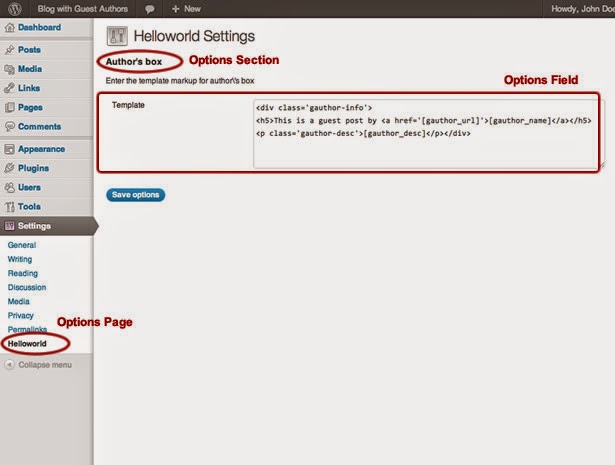
option form


● Modify the function that outputs author’s box (in core.php)

We are doing so as to get the template from the database and replaces placeholder data ([gauthor_name], [gauthor_desc]), [gauthor_url], with the corresponding values.

/* Create author's box markup */
function mp_helloworld_author_block(){
 global $post;

$author_terms = wp_get_object_terms($post->ID, 'gauthor');
 if(empty($author_terms))
 return;

$name = stripslashes($author_terms[0]->name);
 $url = esc_url(get_term_link($author_terms[0]));
 $desc = wp_filter_post_kses($author_terms[0]->description);

//get template from option
 $options = get_option('mp_helloworld_options');
 $out = (isset($options['authorbox_template'])) ? $options['authorbox_template'] : '';

$out = str_replace(
 array('[gauthor_url]', '[gauthor_name]', '[gauthor_desc]'),
 array($url, $name, $desc),
 $out
 );

return $out;
}

Lastly, you will see plugin that creates a nice guest author’s box under post content.
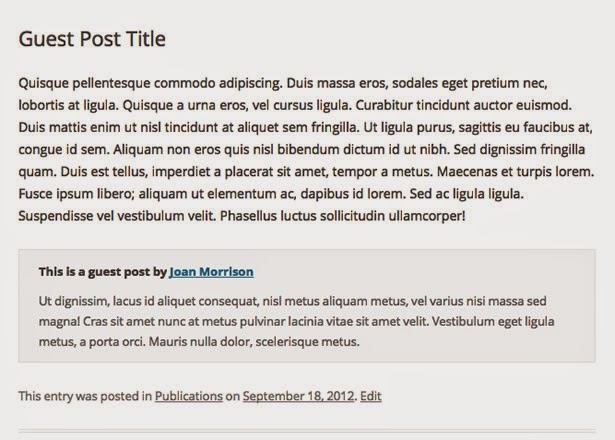
Guest Author Box

Wrapping Text

One can have to implement loads of plug-ins to store and access option data. However, with this option, you can deliver the ability to tune the plug-in according to your user’s needs. Hope this guide will be useful for you. If you have any questions through development task, let us know through comments.

Picture: Bjarne Winkler/Flickr

6 WP Plugins that Can be Used with Closed Eyes For SEO Achievements

Are you using WordPress to run your website? If yes, it is the best platform among others as it gives an ability to extend the functionality of your WordPress installation with the use of plugins. Today, WordPress users can find plethora of WordPress plugins that can extend the features and functionalities of your site and make it more powerful.


top 6 wp plugins

Moreover, you can find 35000+ plugins today in the market and each plugin has its own features to offer; therefore, it is essential for you to make use of only those plugins that give your desired results. If you want to boost SEO of your WordPress website, you need to make use of WordPress plugins that enhance SEO of your site.

Here in this blog, I have listed 5+ advanced and most powerful WordPress plugins that are known for boosting SEO of your website.


1. Widget Logic

Widget Logic is one such WP plugin that works wonderfully with your widgets. Users of this plugin can get an extra option into each widget, where they can easily define where widget should/should not appear.

It allows you to get control over pages that widgets will appear on, so make use of this plugin that works exceptionally with widgets of your site. While using this plugin, users need to make sure that they are confident with using some PHP code because wrong use of it can lead to some problems.


2. All in One SEO Pack

When it comes to All in One SEO Pack, it is the most powerful SEO plugin that known for making lots of things done. Using this WordPress plugin, users can do things like optimizing tags, making sure keyword density and more. The best part of this plugin is that it does everything automatically without needing user’s side. So, WordPress platform users need to use this plugin in order to boost of their site.


3. Simple URLs

Simple URLs is another best SEO WP plugin that is a complete URL management system. It enables users to develop, manage and track outbound links form their website with the help of custom post types and 301 redirects. In short, it is highly advanced plugin that works best for your site.


4. SEO Content Control

Being a highly wonderful SEO plugin, SEO content control goes through all of your content and highlights all those pieces that are weak in terms of SEO. Using this plugin, it becomes easy to check your content and make changes in it to allow the page to get ranked quickly. Moreover, it also helps you out in understanding what you should consider while developing future content.


5. WordPress SEO by Yoast

With the help of WordPress SEO by Yoast, WordPress users can boost their site’s SEO as it helps them to write better content and have a fully optimized site that they are looking for. According to me, it is highly essential plugin for your website, so make sure to download it and enjoy its easiness of using.


6. Use Google Libraries

It is highly powerful yet effective WP plugin that known for alternating JavaScript libraries that called locally on your own server with Google’s own CDN. This is one such plugin that saves on bandwidth, so users should use this plugin to compressed versions of the scripts and boost the chance that a user already has such files cached.


So, these are advanced WordPress SEO plugins that can help WP users to boost the SEO of their website without any hassle. Moreover, businesses can also get their own plugin that has their desired features and functionalities, but they need to hire a professional WordPress developer to get WordPress plugin development service.

Summary: Want to boost SEO of your WordPress website? If yes, you need to make use of WP plugins that are especially designed to enhance SEO of your site. In this blog, you can find 5+ powerful WordPress plugins that you can use and improve SEO of your website.


WP CleanFix - A New & Simple Way to Keep WordPress Database Clean

WP CleanFix is one of the excellent WordPress plugins that check, repair, fixes and optimizes your WordPress blog in an exceptional way. Yes, you read it correct. WP CleanFix has got fresh update to its release and now it brings innovation with its features, performance and functionalities.

WordPress Database Clean

Many of you all may still don’t have information about CleanFix, which is the most powerful WordPress plugin, to take care of lots of unnecessary data that stores in your databases such as post revisions, the like, not-so-updated tables, spam comments and more.

With just one simple click, you can run your WordPress site very effortlessly. In addition, it is all in one plugin that mainly designed to check, repair, fix and optimize one’s WordPress blog and website.

Finally, this plugin gets more power with its new release that introduces many new features and newness to this plugin. Without discussion more about it, let’s have a look on what’s new in this plugin:

CleanFix’s latest and new release is completely wonderful as it comes with unique features that users have been asking for very long time. Describing its all new features here is not possible, but we can give a look on major features that widely demanded by users.

Added (WPDK) User Transients Checking And Cleaning

Added Check
For Unapproved,
Trash and Spam Comments

Added Transients Checking And Cleaning

Extends HTML Editor: Fontname, Size, Color, Extra Tags

WordPress MU Compatibility

Database Tables Optimization

Pay And Get Updated Version


Apart from these features, there are many other features that are added in this plugin. The new release of CleanFix is a paid version for all those, who are new to this plugin. However, current users can get the new release for free.

Well, this one such plugin that is perfect for all, who are looking to get rid of irritated database management that regularly increases problems. With this plugin, they can literally clean their WordPress site up from missing categories, Meta tags, users and more.

The best part of this plugin’s update is that it representing lots of functions that provided as single plugins. You can easily make them obtainable very easily through a clean dashboard for the website management.


New CleanFix - for $15

When it comes to new CleanFix, it is obtainable for all the new wpXtreme users with huge discounted amount $15. It is a highly powerful plugin, but the price is much competitive compare to its usefulness.

If you are impressed with the features of new CleanFix, make sure you purchase it for your website and keep your WordPress site clean. Once you purchase this new plugin (CleanFix) for WordPress, you will get following mentioned things:

The all new CleanFix for WordPress and its updates that comes with it for 1 year.

It doesn’t matter whether you are familiar with WordPress or not, you can get excellent customer support.

All the new features and improvements obtainable to CleanFix users.


Its clean and
simple UI allows users enable/disable every single feature very smoothly with just one single click.


So, it is one of the excellent releases of CleanFix plugin that make it extremely easy for WordPress site and blogs to face up with unnecessary data. To get more information on WordPress plugins and its development, you can click here.

Images made by Freepik.com

wpForGlass – A New & First WP Plugin for Google Glass

Today, Google Glass is one of the trendiest technologies with an optical head-mounted display, which is being developed by Google in the Project Glass research and development project. Across the world, lots of people have appreciated this product because of its incredible features.


Before this product launched in the market, it already got a WordPress plugin. Isn’t it completely amazing?

At Weber Shandwick, a PR and communication firm, a team of experienced people has developed the first WordPress plugin called wpForGlass, which easily interfaces with Google Glass in order to publish content without any hassle.

Google Glass’s first WP plugin lets users to post to their WordPress blog from Google Glass. It is completely wonderful for WordPress users, who need to post any important stuff on the go.

At the moment, this plugin is operated by touch; however, according to Mashable a team of WP developers also planned to add voice commands but now it's "in the pipeline."

Now, wpForGlass makes it easily possible for people to take a photo, video or anything and quickly send it to their WordPress blog. Users of this plugin can also speak any caption before their media is uploaded.

Moreover, the use case of this plugin is much clear as it uses the Mirror API from Google to enable users to post pictures and videos with Google Glass on their blog.

Many of you all may think how this plugin works and what kind of features and benefits it offers in our day-to-day life. Well, using this plugin is not a big deal as WordPress user can use this plugin that interfaces with Google Glass to publish content.

Let’s give a look on wpForGlass plugin’s uses, features and how it works:

wpForGlass – How it works?


When it comes to wpForGlass, it uses Google’s Mirror API in order to send out the data through Google server. All the users will need an SSL certificate, when they first set up this plugin.

The certification of this plugin gives an ability to set up cron jobs and Mirror API Access to develop an OAuth 2.0 client ID for your application.

Moreover, it is also crucial to note that the shared media is practiced on Google servers, and then downloaded to the WordPress website that may take some minutes to process.

Here’s a video by the plugin’s creator demonstrating how it works.


wpForGlass – Give New Height to Journalism & Live Blogging


wpForGlass is one such WordPress plugin for Google Glass that has the potential to be revolutionary for journalism. This plugin made it extremely easy to deliver content and news to people in a live environment. Being a highly beneficial plugin for journalists and live bloggers, this plugin allows hands-free and propinquity publishing benefits to users.

Recording events and transmitted in near real-time becomes much easy for people and they don’t need a live news station camera feed also. It has capability to shoot and transmit pictures, videos and other stuff to a blog in a hands-free environment.

It opens many new capabilities for journalists, documentations and bloggers, who were until busy to carry their notepads, camera and phones in their hands to observe and report. Google Glass’s plugin code is open source, so Glass explorers can take benefit of this plugin.

Weber Shandwick's vice president of technology innovation Ozzy Farman said

Instead of pulling out a phone or camera to take a picture that needs to be posted online right away, this is so much easier.

He also added

The process of publishing through Glass feels as instantaneous as blinking (or winking). We feel that in today’s socially driven media environment, instantaneous publishing is going to be, hands-down THE killer app for Glass.

So, all the journalists and live bloggers can make use of this plugin to make their work a lot easier than before and enjoy a complete range of features.

Wrapping Text:

Recently, Folks at Weber Shandwich has launched the first WordPress plugin for Google Glass that interfaces with Google Glass in order to publish content without any hassle. This plugin is completely amazing because of its wonderful features that allow users to publish images and videos on the go.

Image Credit: rimazrauf.com, WordPress

WordPress Owners Improve Functionality of Your Site with Third-Party Plugins

Today, WordPress has witnessed tremendous growth in the market as it is the most powerful platform with lots of themes, functionalities and other features. WordPress users can get the ability to customize this CMS as per their business requirements.

However, users can also get lots of WordPress plugins for third-party services as WordPress plugins can improve the effectiveness, performance and functionality of your website.

WordPress Owners Improve

As we all know that there are numerous plugins obtainable on the web, so it is quite difficult for users to choose effective yet feature-rich plugins for their website. Here, I presented 5 essential WordPress Third-Party plugins that you can add in your website to expand the performance of your site.

Visual Form Builder:

Now, you can give your website a professional touch by integrating contact forms in it. With the Visual Form Builder plugin, it is much easy for you to so this as it allows you to develop different kinds of forms of your website with no coding required. You can easily get fully functional forms up and running in no time as its simple drag and drop facility is excellent.

Online Backup for WordPress:

If you are looking for a data backup plan for your website, there is nothing better than Online Backup for WordPress as it is free yet easy-to-use plugin for users. This plugin offers schedule automated daily or weekly back-ups, perform manual back-ups and more. For additional or extra security, It will also en encrypt stored files. There are no chances of losing anything as your both database and file system are backed-up.

W3 Total Cache:

How many of you all know this that the website speed is also factored into Google ranking algorithm? It is extremely important for you to give importance to your website’s speed. W3 Total Cache plugin enhances your website’s performance and makes it run faster by displaying users a pre-created version of your pages rather than executing the PHP scripts every time a page loads. Website visitors as well as search engines prefer for faster-loading websites.

SEO Smart Links:

SEO Smart Links is a great WordPress plugin that allows you to enhance your on-page SEO automatically with this simple yet easy-to-use plugin. It scans your content and blog posts and easily inserts related internal links to other posts and pages that are based on keywords. It comes with some exceptional features including open links in new tabs, no-follow links, open links in new tabs and more.

Akismet:

Akismet is also the most popular WordPress plugin that saves your maximum time and keeps your reputation of your small business website intact by weeding out some spam comments. There is no need to delete those comments yourself and your visitors also don’t have to bother about wading with badly written spam comments to get involve in discussion.

So, these are some of the best WordPress plugins that you can use in your website and get numerous benefits. However, if you want to get your own WordPress plugin to expand your website’s capability, hire WordPress developer from any reliable WordPress development company and get your desired WP service.


Wrapping Text:

Now, WordPress website owners can boost the functionality of their website by making use of different WordPress plugins that are obtainable on the web. In this blog, I have provided 5 essential WordPress plugins that you can use to improve your website performance and other features.

Developing Plug-ins for WordPress? 5 Things You Must Care of

According to survey, about 170,000 sites are hacked in 2012 through plug-ins, theme, host and end-user. Among all, approximate 22% of WP sites are hacked due to plug-in vulnerabilities and 29% due to themes, according to image show below.

How Do WordPress Blogs Get Hacked?

Looking at such figures, we have to consider WordPress security while developing themes or plug-ins. So, to tackle this issue, here we come with some effective tricks that help users/developers while they are develop WordPress themes and plug-ins. So, what are you waiting for? Start reading this article and get to know how secure is your website?


1#. Develop with debugging ON

While developing plug-in, we don’t want to trigger by deprecated notices, warnings or fatal errors. Moreover, such type of errors unveils your server information like file paths, if your server has error reporting turned ON. With this, you are invite hackers to hack your site in better manner. If you are turning on to debug mode, it will cause such types of errors to be seen and thus, you can simply path them accordingly. It is recommended to add define( WP_DEBUG, true ); into your wp-config.php file to enable debugging.


If we are talking about production environment, you want such things should be hidden to end-users. However, you may want them logged, so you can track them secretly. In such situation, you can add this:

● define( 'WP_DEBUG_LOG', true );
● define( 'WP_DEBUG_DISPLAY', false );

Such things allow you to log them inside the wp-content/debug.log file.


2#. Avoid direct access to your files

There are many hosts allows direct accessing to the file on servers, adding those who are belonging to your plug-ins. If you are directly accessing your plug-in files, it will cause PHP errors that seem like rule #1, will also direct to confession of your WordPress install path.


If you want to avoid such types of errors, you simply have to add a simple ABSPATH check that terminates the script, if it accesses outside of WP.

if ( ! defined( 'ABSPATH' ) ) exit; // Exit if accessed directly.


3#. Prevent unauthorized access

Users should have to stop unauthorized users from breaking things, if functionality inside their plugin gives access or allows change of sensitive data. Users can use the handy current_user_can() function to returns whether or not a user has access to a given capability, if he want to perform an action.


4#. Avoid CURL when posting remotely

It is one of the commonest bugbears. Using WordPress' WP_HTTP class and wrapper functions, wp_remote_get and wp_remote_post, one should and can easily avoid CURL directly. One of the best things about using such functions is it takes care of encoding data along with offering fallbacks while CURL is not available.


5#. Nonce your forms and urls

CSRF stands for Cross-site request forgeries, where hackers can trick a user into executing actions against their determination. Talking about the nonce (Number used ONCE), it is a unique token created to use an action name and a timestamp that you can use for checking a request. Users can able to add Nonces to both forms (using wp_nonce_field()) and urls (using wp_nonce_url()).

For Example:
Take your delete link and and nonce it:

<a href="<?php echo wp_nonce_url( 'delete.php?id=1', 'delete_link' ); ?>"></a>

We are verifying the nonce is valid using wp_verify_nonce, when this is processed:


1). if ( ! wp_verify_nonce( $_GET['_wpnonce'], 'delete_link' ) )

2). die( 'Security check' );

So, below given are effective 5 tips that you should be aware of while developing WordPress plug-in for your site. If you want to create secure plug-in/s, then go for details of our WordPress plugins development service.

Image Credit: mikejolley.com

15 Excellent Blog Marketing Plugins For WordPress

The best way to promote your blog is to share bits of it. People are not stupid enough to instantly subscribe to a blog without first knowing a little bit about it, and the most efficient way of doing that is to give them a taste of what your blog is all about. Here is some WordPress plug-ins that will help you to share and promote your blog.


Blog Marketing WP Plugnis

Image Credit: fl1 group

Follow Me

This is a widget that allows you to add your social media profiles onto your blog posts. It is a good way of getting more Twitter followers, which may help you to further promote your blog in the long term.


Bookmarkify

This sprightly named plugin adds bookmarking links to your blog posts and even some of your other pages too. It adds social bookmarking links which will help some of your readers promote your blog posts.


PingPressFM

This is a WordPress plugin helps to submit your blog post onto the “Ping.fm.” With this plug-in, one can easily able to update their blog over thirty networks from one place.


I Love Social Bookmarking

This WordPress plugin allows your readers to share your content through various social media services with the help of a clutter-free drop-down list of attractive icons. To submit any post, you just have to use the drop down list of icons available at the bottom of your posts.


Social Dropdown

With this WordPress plugin, user has several bookmaking options that allow them to promote your blog posts over the social media networks. It is good for keeping tight space margins as it operates via a drop-down menu system. This means that the options are slightly easier to miss, but it also makes your website look a lot more professional, clean and uncluttered.


SociBook

This WordPress plugin allows you to add social bookmarking links to the bottom of your blog posts. It allows you to choose which ones you want and you can even define which icons are used on your blog posts.


Sociable

This is a WordPress plugin adds social media buttons to the posts that you have created. When you post them on your blog, the social media buttons will appear so that people may “like” or “ping” or Google+ "like" your posts. This will make your blog posts appear more popular, and the “like” or "ping" will show up on the user’s social media profile.


LifeStream

LifeStream put your social feeds on to your blog posts. It will then allow you to gain more social media followers as they will be able to see things that happen in your timeline on social media, but they will be able to see them on your blog.


Bookmark Me

This is a good WordPress plugin because it will focus on collecting the non-English bookmarks sites. It adds social media bookmark buttons to your blog posts, but will not simply stop with the English buttons and English bookmarks. It will help you to broaden where your blog is promoted.


Social Bookmarking RELOADED

This is a WordPress plugin adds graphical links to the bottom of your blog posts. The user may then submit your blog post to a number of social media networks. The graphical links are all XHTML compliant so you will not have any users come across any compatibility problems.


Social Bookmarks

With this WordPress plugin, you may add up to fifty social bookmarking submission icons to your blog posts. The options include all of the major and popular bookmarking sites and some of the little ones too.


obsocialbookmarker

This is a WordPress plugin adds user-submission links to your blog posts. It adds them at the bottom of each of your posts, and they lead to different social bookmarking sites.


ShareThis

This is a plugin allows people to share parts, or all, of your blog post across different social media networks. It is a good plugin for helping other people to promote your blog. It is also a good plugin that you can use yourself in order to share contents of your blog. With any luck, people will see what you wrote and will visit your blog to see if you have any more of the same sort of thing.


SocioFluid

This WordPress plugin will add bookmarking icons that link to the biggest social media networks for bookmarking. It is good because it has big icons whilst does not make the page look too cluttered.


Retaggr

This plugin allows you to add a virtual business card to the blog posts that allow people to visit your social media network profiles and learn a little bit more about you. They may even “follow” or “friend” you that mean they expose themselves to all the promotion that you put on your social media profiles.


Author:


Nellie
Hi! I'm and currently belong to the students body. I'm always eager to find out something new and become familiar with it. I love to deal with researches and want to develop in the field of writing. Moreover, I started moving in this direction! I work as a writer for Admission-Essays.org , which aims at admission essays becoming clearer for students. If you have any questions concerning education, I'm always ready to help.

Top 6 Leading WordPress E-Commerce Plug-ins For Selling Products Online

There are numerous WordPress plug-ins available online for adding E-Commerce functionality of your business site. WordPress E-Commerce plug-ins is latest buzz among the online entrepreneur as it allows developing e-store effective and attractive. There are thousands of products available at online store; it becomes difficult to manage products at same time. In such case, WordPress E-Commerce plug-ins is helpful. So, check some wonderful plug-ins that helps selling product online excellent.


Jigoshop


Jigoshop WP Plugin

Another well-known WordPress E-commerce plug-in, Jigoshop is created on the core of WordPress, enabling robust performance and steadiness. Webmaster can able to sell anything through this online store, whether it would be affiliate products, downloadable product or anything. With this plug-in, you can get detailed report with dedicated custom dashboard, including stock management, sales graphs, orders and reviews notifications, etc. Even, you can also add functionality through extensions as well.


[ Free Download ]


WooCommerce – excelling eCommerce


WooCommerce – excelling eCommerce

WooCommerce is one of my favorite free shopping carts plug-in that helps to convert any WordPress site into excellent online store. WooCommerce is highly rated than other E-Commerce plug-ins available online as it blessed with enterprise class features that monitor e-commerce activities perfectly. WooCommerce is best known for its marvelous features like rating, product filtering with faceted search, host of payment options, etc. This plug-in also supports external WooCommerce extensions for enhancing functionality.


[ Free Download ]


WP e-Commerce


WP e-Commerce

WordPress e-Commerce is one of the most exceptional E-Commerce plug-in that has more than 2.4 million downloads across the globe. Available for free, it comes with free shopping cart plug-in that allows easy setup of store. The best thing about this plug-in is it supports any standard WordPress themes. WordPress e-Commerce plug-in is completely customizable and loaded with a collection of templates for better personalizing functionality. Numerous payment options like Google wallet, PayPal, authorize.net, manual payment, etc. are available with this plug-in.


[ Free Download ]


Cart66


Cart66 WP Plugin

As name suggested Cart66 Lite is a light weight plug-in, but it doesn’t have limited features. This amazing plug-in has capability to transfer your normal website into fully functional online store that sells products/service. Moreover, with this plug-in you can also transfer your website into member ship portal through which you can sell subscription services. Cart66 comes with two excellent versions, i.e. basic free version with limited features and paid version with access to forums.


[ Free Download ]


WordPress Simple PayPal Shopping Cart


WordPress Simple PayPal Shopping Cart

WordPress Simple PayPal shopping cart is best plug-in for those people, who like to sell anything from their site without transforming it into online store. With this plug-in, you can simply add “Add to Cart” button by using short-codes. You can also have option of using dynamic function to show “Add to Cart” option. One of the best things about having this plug-in in your site is it doesn’t need a lot of configuration. This excellent shopping cart plug-in is compatible with WordPress multi-site installation and incorporated with NextGen photo gallery that allows selling pictures online through blog.


[ Free Download ]


Welcart


Welcart WP Plugin

Created in Japan, Welcart comes with fabulous shopping cart functionality with outstanding features like membership function, order member function, etc. allowing store to run smoothly. With this plug-in, you can get 8 different Widgets. Moreover, admin can able to incorporate other essential functionality like shipping conditions, membership system, special benefits, etc.


[ Free Download ]


Recommended Reading: Best WordPress Plugins for Your e-Commerce Blog & Website


Above given are top five WordPress ecommerce plug-ins that helps to enhance website functionality and provides excellent shopping experience to online shoppers.

10 Attractive Free Twitter Plugins For WordPress

There are millions of users using social media sites and Twitter is one of them. As social media networks are expanding at the great ways, it becomes compulsory for any business to adopt such strategies to extend business at the high level. Any company can able to increase profit of their business by adopting Twitter into other marketing opportunity. We all have an idea that using Twitter for marketing purpose can consume huge time, so it is must to have plug-in to minimize task.


Nextend Twitter Connect


Nextend Twitter Connect is one of the best plug-ins for WordPress that helps to access Twitter account. You can able to sign-up with Twitter your existing account with their Twitter credentials. This plug-in is a light weight and easy to use. User has to register with a Twitter app and have to place corresponding information in the admin panel.


Click to Download


Rapid Twitter Widget


With Rapid Twitter Widget, one can easily show collection of latest tweets in a WordPress widget from more than one account. The best thing about this widget is it doesn’t slowing your website. It doesn’t applying any style to your website and delivers you a complete control over the designing part. Thi widget is compatible with Version 1.1 of the Twitter API.


Click to Download


Track Twitter


Twitter Search Tracker is another WordPress widget, used to show a Twitter search or a Twitter hashtag in your sidebar. Having this plug-in, you can simply do searches with great flexibility and can able to show Hashtags to other people or cumulative Twitter streams.


Click to Download


JM Twitter Cards


This wonderful JM Twitter Cards plug-in helps to simplify Twitter cards integration on WP. One of the best things about having such type of plug-ins is you can easily customize Twitter card in whatever sense you want.


Click to Download


WD Twitter Feed


With WD Twitter Feed, visitors can able to follow your account with just one click. To get latest update of your account, visitors don’t have leave your site.


Click to Download


Twitter Tools


Twitter Tools is best known for making connection between your WordPress blog and Twitter account. With this plug-in, you can able to develop a blog post from each tweet. Moreover, you can able to browse your tweets through #hashtag, @mention, or user account.


Click to Download


HL Twitter


With HL Twitter, you can easily see your tweets as a widget in your sidebar. Moreover, users can browse entire Twitter history from their blog. Having this plug-in, you can simply track multiple Twitter accounts and store all tweets on your blog. User can tweet from their Dashboard or have HL Twitter to tweet on your post automatically through customizable message.


Click to Download


Twitter Widget Pro


Twitter Widget Pro allows managing twitter feeds such as URLs into links, parsing @username and #hashtag. This widget allows showing profile picture, time and date, according to your requirements. In addition, this also show how long ago tweet happened, about 2 hours, 3 hours, etc.


Click to Download


Rotating Tweets


Rotating Tweets is one of the excellent Twitter plug-in, displayed tweets in many different languages. Users just have to set multi-lingual option and Twitter 'follow' button automatically translate tweet to your preferred language. In this plug-in, you can find a ton of visual options that are easily customized.


Click to Download


The list of free twitter Plug-ins for WordPress is not limited; you can have many more plug-ins. If you like to share any other plug-in or related things with us, feel free to ask through comment section.

7 Best E-mail Marketing Plug-ins for WordPress

WordPress is one of the most acceptable CMS among the users due to its amazing functionalities and marvelous plug-ins. Adopting different plug-ins of WordPress extends capabilities of websites. Excellent!! If you have made decision to install Email Marketing Plug-ins in your website as a part of marketing strategy. Delivering core knowledge of your business through e-mail marketing helps to reach your business at the great heights.


E-Mail Marketing Plugins for WordPress

Next step, you have to take is hire WordPress plugin or extension development company for installing essential plug-in in your website. Before installing any plug-ins for email marketing, ensure to read this blog that contains information about different types of plug-ins.


1). ActiveCampaign


ActiveCampaign

ActiveCampaign is another excellent option available for email marketing software. It helps to establish personalized marketing campaigns to grow business at the great heights. Webmasters, just have to install ActiveCampaign plug-in in their blog. ActiveCampaign contains features like Emails customization, option of detailed report and analytics, collection of email templates and many more.


[Read More | Download]


2). Tribulant WordPress Newsletter Plug-in


Tribulant

Having uncountable unique and useful features, Tribulant is one of mu favorite WordPress Newsletter Plug-ins. This plug-in allows users to make unlimited number of subscribers and send unlimited number of emails to any list of subscribers. Paying one time subscription fees, webmasters can easily offers newsletter subscription to their blog readers. Moreover, webmasters can also track their users to know how many emails their user read.


[Read More]


3). Wysija Newsletters


Wysija

With simple drag-and-drop interface, Wysija is one of the hottest choices of newcomers to send newsletters and email to their subscribers. This plug-in contains list of attractive Wysija themes that gives amazing looks to your websites in computer, mobile or other smart devices. Being the best supported newsletter plug-in, it can be accessible without creating any problem.


[Read More | Download]


4). ALO Easymail


ALO Easymail

ALO Easymail is one of the excellent Email Marketing Plug-ins for WordPress used for send loads of mails at same time. Using this plug-in, users can able to subscribe newsletters and get appropriate information regarding business to the audience. Webmaster, who wants to send different newsletters in different languages, can use this plug-in in their blogs or WordPress websites.


[Read More | Download]


5). Subscribe2


Subscribe2

Subscribe2 is an excellent option for those webmasters, who want to annoy their visitors with unsolicited emails. With this subscription manager, you can send notifications of new posts and more difficult mails to your subscribers.


[Read More]


6). MyMail – Email Newsletter Plugin for WordPress


MyMail

Mymail is one of the simplest Email Newsletter Plugin for creating, tracking and sending Newsletter Campaigns to the subscribers. With a simple sign-up creation, you can also have unlimited customization features. To make your e-mail more attractive, you can take help of Background Image support and adopt creative background option.


[Read More | Demo]


7). WP Autoresponder


WP Autoresponder

As name suggests, WP Autoresponder is an amazing customizable autoresponder that send responding mails whenever any mail comes in your mail box. This simple yet effective plug-in extremely easy to use and gather an accurate information of your subscribers that unswervingly modify your email marketing plan.


[Read More | Download]

Below, we have discussed some popular plug-ins, software and services of email marketing and newsletters that surely helps to extend your business with email marketing service.